Going Away? Make Your Home Look Lived-In with eWeLink
Make your home look lived-in and stay connected while you’re away.

Smart scenes work best when they run at the right moment, not just the first moment a device changes state.
With the “Stayed on/off for a duration“, your scenes run only after the supported devices have stayed on or off for the duration you set, helping you avoid unnecessary triggers, manage device runtime, and reduce wasted energy.
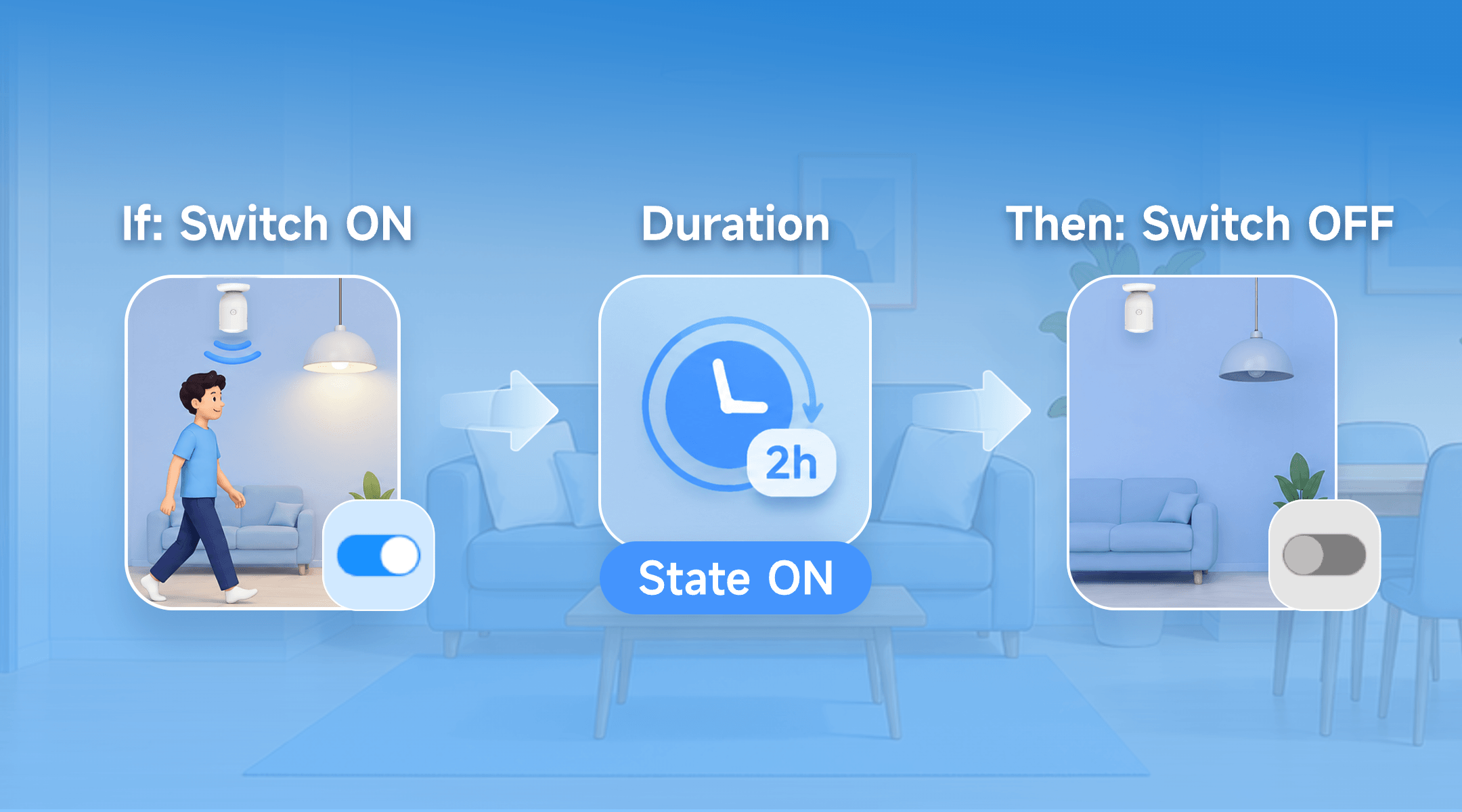
When you use a supported device as a scene trigger and select On or Off, you can enable a duration option.
Instead of running the scene immediately, eWeLink checks whether the selected state stays true for the full duration.
For example, if a smart plug connected to a garden pump turns on, the scene does not have to run right away. You can set it to run only if the plug has stayed On for 10 minutes. If the plug turns off before the set duration, the scene will not run.
Instant On/Off triggers are useful when a scene should respond right away. For example, when a switch turns on, you may want another device to turn on immediately.
But not every On/Off change needs an instant action. If a device only changes state briefly, or if you want to make sure it has really been left on, has run long enough, or has stayed off for a while, an instant trigger may run too early.
That is when a state duration setting can help. This small wait can help you save energy, avoid unnecessary actions, manage device runtime, and make scenes more predictable and manageable.
You will see the duration option after choosing On or Off for a supported trigger device.
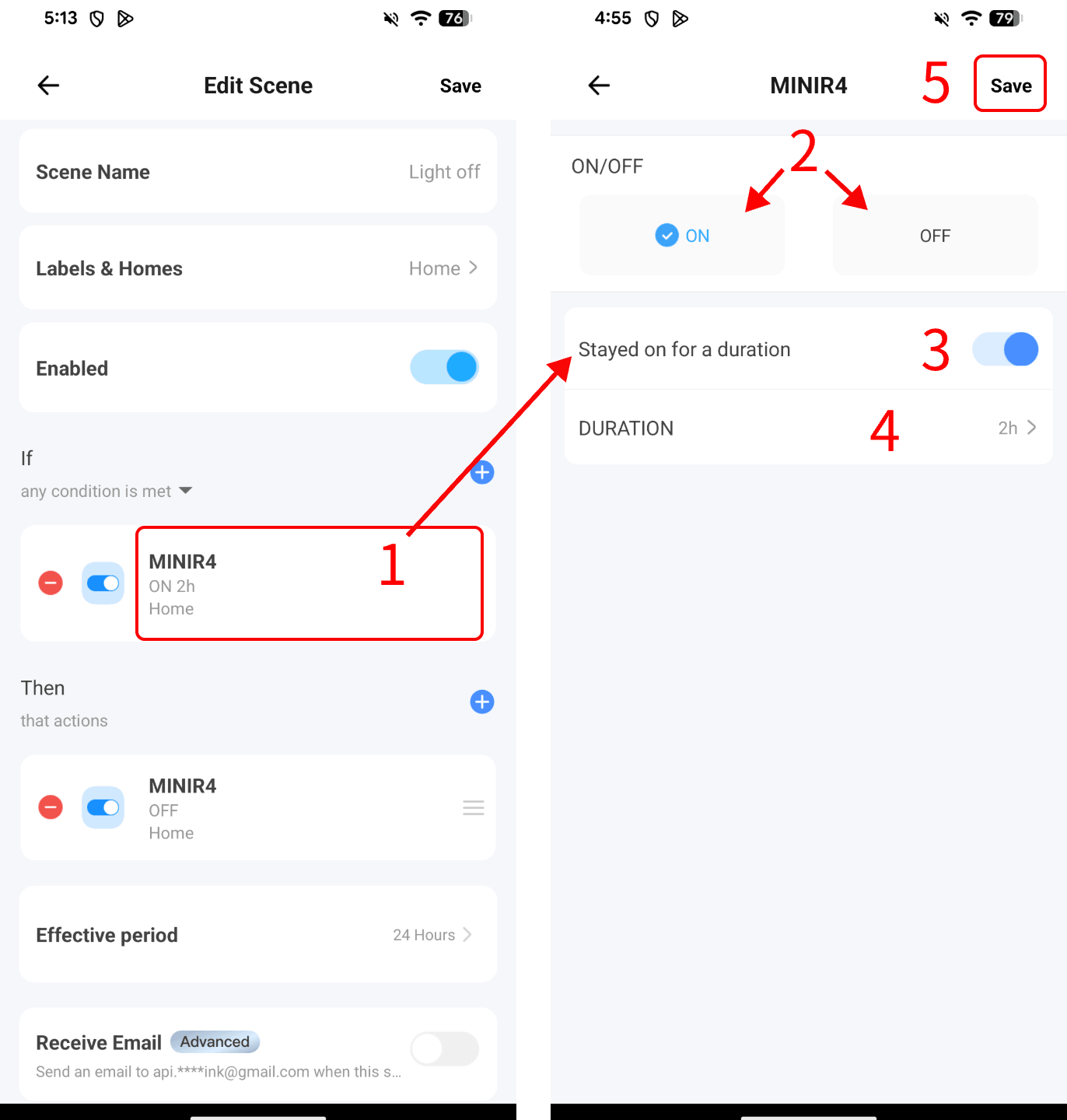
Once saved, the scene will only run when the selected device has stayed in that state for the duration you set.
If these devices are connected and controlled by the eWeLink-supported plugs or switches, you can build scenes with the duration setting like these:
If: A lamp stays on for 2 hours,
Then: Turn it off or send a notification
If: A pump stays on for 10 minutes
Then: Turn it off automatically
If: A fan stays on for 30 minutes
Then: Turn it off
If: A compatible heater stays on for nearly 3 hours
Then: Send a notification or turn it off when safe
These scenes are useful when a device should run for a while, but not indefinitely. A short wait helps eWeLink tell the difference between normal use and something that may need attention, such as a forgotten lamp, an overrun pump, a fan left on after ventilation, or a heater running longer than needed.
For heaters, pumps, and other high-power appliances, make sure the connected device is safe and suitable for use with your plug or switch.
This feature is available for eligible devices used as scene triggers with an On or Off condition.
|
Device Type |
Eligible Device Models (Examples) |
|
Single-Channel Plug |
SONOFF BASIC_R3 SONOFF MINI SONOFF RF_R2 SONOFF S20R1 SONOFF S26 SONOFF S31 Lite SONOFF S55R1 SONOFF S30 AIB-xU1 CKCP-001 |
|
Single-Channel Plug_Support 2.4G eWeLink-Remote |
SONOFF BASICR4 SONOFF MINI-D SONOFF MINIR3 SONOFF MINIR4 SONOFF S40 lite BL1-S04-01 CK-BL602-4SW-AY |
|
DIY Smart Switch |
SONOFF Basic SONOFF RF SONOFF SV |
|
Single-Channel Switch |
SONOFF RF R2 SONOFF T1 1C SONOFF Touch SONOFF TX1C |
|
Power detection Plug |
SONOFF IW100_US SONOFF IW101_US SONOFF Pow R2 SONOFF POWR3 SONOFF S31 GSA-D76 PSA-X67-GL |
|
Temp & Humi Monitoring Smart Switch |
SONOFF S22_CN SONOFF TH10 SONOFF TH16 CK-BL602-TC-01 PSA-BHA-GL |
|
Power Monitoring Plug Overload Alert – Multi-Channel Protocols |
SONOFF S40 SONOFF S40TPA SONOFF S40TPB CK-BL602-SWP1-01 |
|
(POWCT)POWR3 – with LCD Screen |
SONOFF POWCT SONOFF POWR316 SONOFF POWR320D SONOFF S60TPF SONOFF S60TPG SN-ESP32D0-POWR3-01 |
|
Temperature & Humidity Monitoring Switch_Support with History Feature |
SONOFF TH16R3 SONOFF THR316 SONOFF THR320 CK-BL602-W302SE10-01 SN-ESP32D0-THR3-01 |
Start with one device you often forget to turn off, and make your automations easier to manage.
What important features are we missing? We’d love to hear from you! Join our discussion here.
Make your home look lived-in and stay connected while you’re away.
Discover how eWeLink LAN Control enables local control of compatible devices.
Check on your pets and manage your home remotely while away.
Discover how to control, schedule, and automate your lights with eWeLink for a smarter, more comfortable home.