Matter with eWeLink: Supported Devices, Setup, and Pairing Tips
See which Matter devices work with eWeLink and how to set them up.

It’s a holiday season. Time to plan your vacation trip! Wait, here comes a serious question, how to guard your property when you’re out of town? Burglaries increase around holidays and they just look for empty houses. How to make it look like you’re home when you’re actually traveling? Set random timers to turn on/off the lights? Now introducing you a tech-savvy alternative.
What you need are eWeLink supported security camera, lights, and the eWeLink App. Let’s dive right into it.
Add a security camera and lights to your eWeLink App.
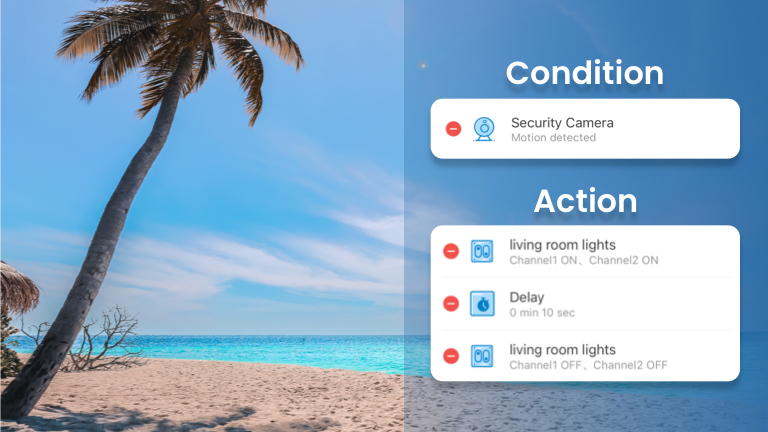
Condition:
Motion detected by the camera
Action:
Turn on the living room lights
Delay in 10s
Turn off the living room lights
With this scene, whenever the motion is detected by the camera, your living room lights will be turned on and then off in 10 seconds. Just mimicking it’s you control the lights at home. Make it look like someone’s inside, and throw off potential thieves or burglaries.
The new security camera, Sonoff CAM-Slim is right for you. It helps keep an eye on your house 24/7.
Also, you can customize the video recording by adding a sensor. The status of the sensor can be set as a trigger. Whenever the status of the sensor changes, the camera starts recording and you get notified right away. More accurate way to record than ever. You can now unlock this feature with eWeLink Camera Plan . Click the hyper link to learn more features about eWeLink Camera Plan.
See which Matter devices work with eWeLink and how to set them up.
Manage devices faster from the eWeLink Home page.
Run your favorite eWeLink manual scenes with Siri voice commands on your iPhone.
Set a duration to confirm device state and run scenes reliably.