How to Build a Smarter Backyard Chicken Coop with eWeLink
Keep a closer eye on your backyard coop with eWeLink through smart monitoring, alerts, and remote viewing.

Backyard chicken keeping is hands-on, but not every check needs a trip out to the coop.
A hot afternoon can raise the temperature inside quickly. Damp conditions can build up overnight. A leaking waterer can leave bedding soaked, and cold weather can turn drinking water into ice before you notice.
With a few eWeLink-compatible devices, you can keep a closer eye on the coop, automate selected equipment, and get useful alerts when conditions need your attention.
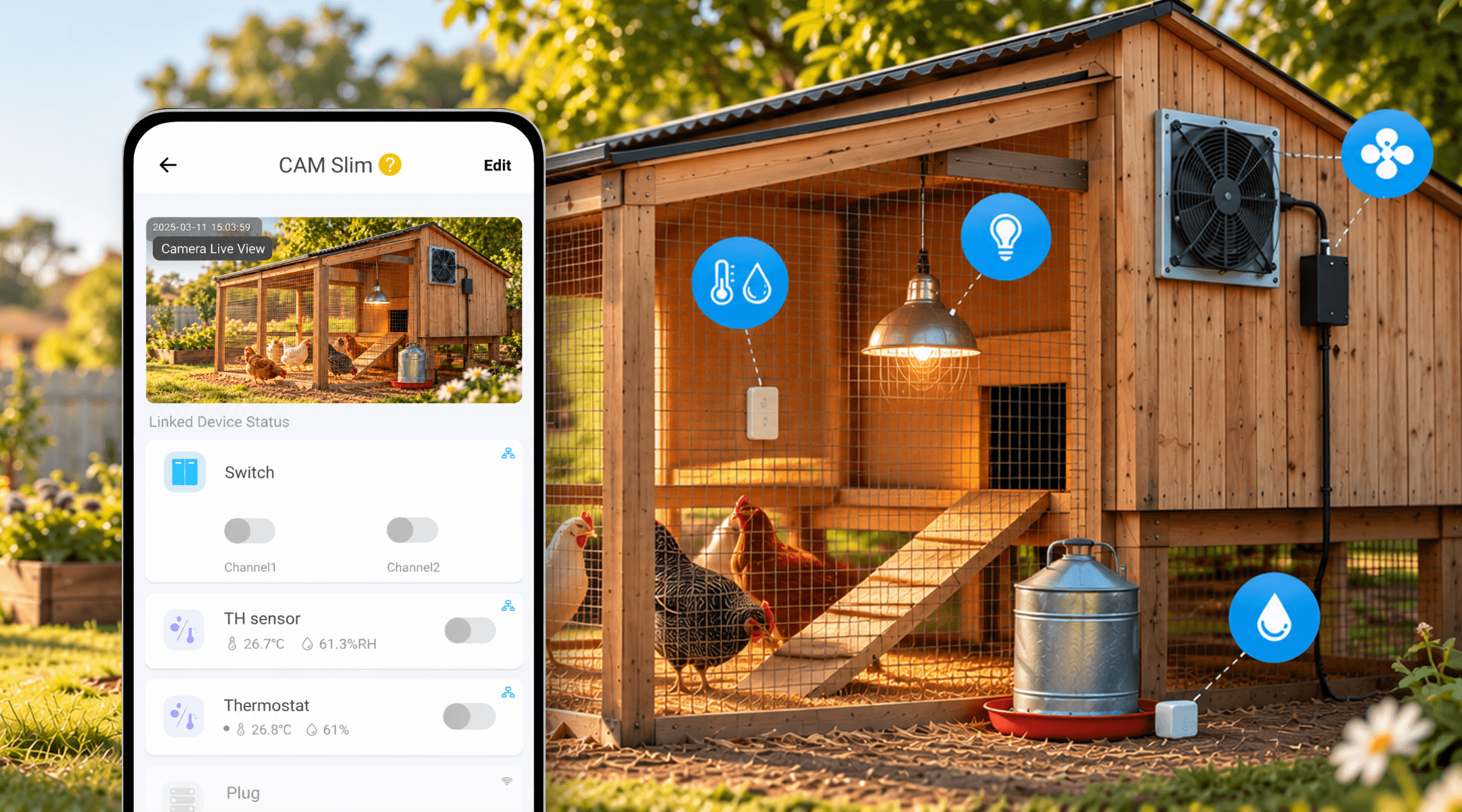
Weather outside does not always tell you what conditions are like inside the coop.
Sun exposure, ventilation, the number of birds, wet bedding, and changing seasons can all affect temperature and humidity. Good ventilation is important because it helps remove excess moisture and stale air from the coop.
A temperature and humidity sensor can give you a clearer picture of what is happening where your chickens actually spend their time.
Add a compatible sensor to your coop, and you can check current temperature and humidity in the eWeLink App, review changes over time, and receive notifications when temperature or humidity reaches the limits you set.
Mount the sensor inside a sheltered part of the coop where it can measure the general environment without being exposed to direct rain, heavy splashing, or curious chickens.
Instead of relying only on the outdoor forecast, you can check the actual coop conditions from your phone.
Tip: There is no single temperature or humidity setting that is right for every flock. Climate, breed, age, coop design, stocking density, and season all matter, so set alerts based on the needs of your own birds and local conditions.
Monitoring tells you when conditions are changing. In some setups, eWeLink can also help you respond automatically.
Chicken keepers commonly use ventilation fans during hot weather to move warm air out of the coop. Some backyard-coop owners already automate exhaust fans using temperature sensors so the fan starts when the coop becomes too warm.
If your ventilation fan is designed for unattended operation and is safely connected to an eWeLink-compatible smart plug or switch, you can create a Smart Scene using the coop temperature as a condition.
For example:
When coop temperature rises above your chosen limit → Turn ventilation fan ON
You can create another scene to turn the fan off again once the temperature falls below the level you choose.
This means the fan does not have to run continuously on a mild day just because you are not home.
Most importantly, a smart fan should support good coop ventilation, not replace it. A properly designed coop still needs adequate passive ventilation and airflow even when the fan is off.
Clean, available drinking water is one of the basics of chicken care, but the problems change with the season.
In cold climates, water can freeze. In warmer weather, chickens drink more. Waterers and supply lines can also leak or spill, leaving wet bedding behind. Poultry guidance recommends maintaining access to clean water and paying particular attention to freezing, leakage, and water availability.
eWeLink can help in a couple of simple ways.
If you already have a temperature sensor in the coop or sheltered run, set a low-temperature notification for the area around the waterer.
The sensor is measuring air temperature, not the water itself, so it cannot tell you whether the water has actually frozen. But a cold-weather alert can remind you that it is time to check the water rather than discovering the problem hours later.
This is especially useful overnight or early in the morning when temperatures can fall while you are indoors.
If you use an automatic waterer, reservoir, hose, or other water supply inside a sheltered area, a leak sensor can provide another useful warning.
Place it where unwanted water from a leaking connection or overflowing reservoir is likely to collect. When water is detected, the sensor can send an eWeLink App notification.
Avoid putting the sensor somewhere that normally gets wet whenever the chickens drink. The goal is to detect unexpected water, not routine splashing.
It will not tell you how much water is left in a drinker, but it can help you notice one common problem sooner: water ending up where it should not be.
Sometimes sensor readings are enough. Sometimes you simply want to see the chickens.
Cameras are already a common part of more elaborate backyard-coop setups. Owners use them to check the coop, run, nesting areas, or roosts while they are away from home.
With a compatible eWeLink-supported camera, Camera Live View in the Insight tab lets you open a live feed directly from the eWeLink App.
You can also link supported switches or plugs to the camera view, allowing you to access selected connected equipment without leaving the live feed.
That can be useful when you are at work, away for the afternoon, or simply do not want to walk outside just to answer a basic question:
Does everything look normal in the coop?
A camera does not replace temperature sensors, water checks, predator-proof construction, or regular visits to the flock. It simply gives you another way to see what is happening when you are not there.
Smart devices work best as an extra layer of awareness, not as a substitute for good coop design and regular care.
Keep these points in mind when adding electrical equipment to a coop:
Be especially cautious with supplemental heating. Poultry extension guidance warns that heat sources in coops can introduce fire risks around combustible bedding, so heating should not be added simply because smart control makes switching it easier.
A smarter chicken coop does not need to be fully automated.
Start with the things that are difficult to notice from inside the house: how hot or damp the coop has become, whether ventilation needs attention, whether there is unwanted water around the drinker, or whether everything looks normal while you are away.
eWeLink can bring those small checks into one place, helping you spend less time wondering what is happening in the coop — and more time responding when something actually needs your attention.
What important features are we missing? We’d love to hear from you! Join our discussion here.
Keep a closer eye on your backyard coop with eWeLink through smart monitoring, alerts, and remote viewing.
Simplify aquarium care with eWeLink through smart schedules, monitoring, alerts, and remote viewing.
Monitor electricity usage, compare trends, and identify high-consumption devices with the eWeLink Energy Dashboard.
Find out why your scenes don’t run and how to fix common automation issues.