How to Build a Smarter Backyard Chicken Coop with eWeLink
Keep a closer eye on your backyard coop with eWeLink through smart monitoring, alerts, and remote viewing.

An aquarium is a small ecosystem, and consistency matters. Lights need a regular schedule, water temperature should stay within the right range for the fish you keep, and a small leak is much easier to deal with when you know about it early.
Aquarium equipment can also run for hours — or even around the clock — making it useful to understand how much electricity your setup is using. And when you’re away from home, sometimes you simply want to check that everything still looks normal.
With a few eWeLink-compatible devices, you can automate routine tasks, monitor important conditions, and keep a closer eye on your aquarium from your phone.
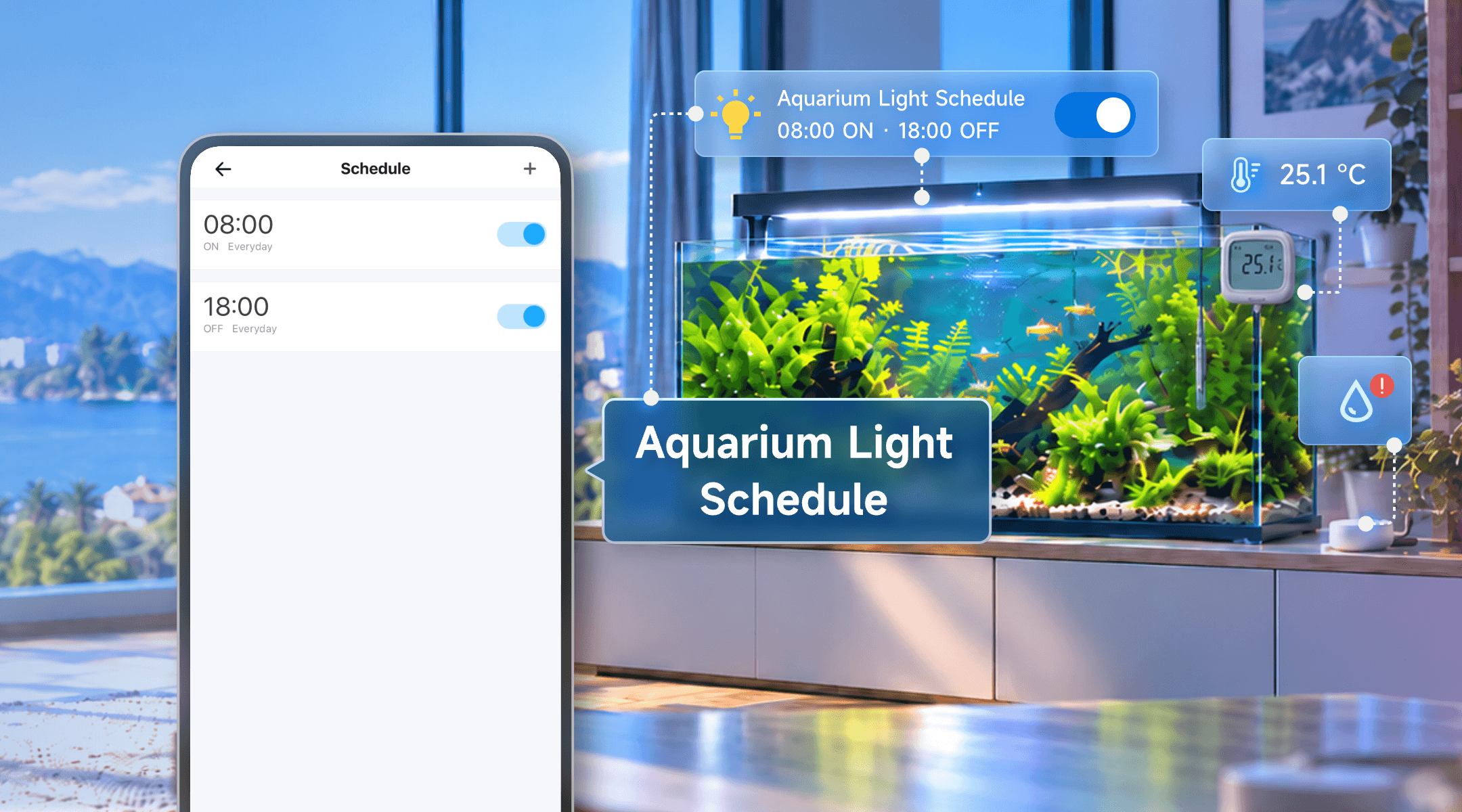
Turning aquarium lights on and off at roughly the same time every day is an easy task to automate.
If your aquarium light does not already have a built-in timer, connect it to an eWeLink-supported smart plug and create a daily Schedule.
For example:
8:00 AM — Light ON
6:00 PM — Light OFF
Choose the actual lighting period based on your fish, plants, and aquarium light rather than relying on one schedule for every tank.
Once the schedule is set, you no longer need to remember the lights each morning and evening. You can still turn them on or off from the eWeLink App whenever needed.
Tip: A smart plug controls power only. If your aquarium light has built-in dimming, sunrise, or color modes, continue using the light’s own controller for those functions.
Lighting is easy to automate, but water temperature is something you’ll want to monitor rather than simply set and forget.
Room temperature can give you some context, but aquarium owners usually care about the temperature that matters most: the water itself.
The SONOFF SNZB-02LD uses an external temperature probe that can measure temperature in liquids. After connecting it to a compatible Zigbee gateway such as ZBBridge-U, you can view the temperature in the eWeLink App, check historical data, and create notifications for temperatures outside the range you choose.
Place the probe in the aquarium according to the product instructions, then set high- and low-temperature alerts based on the needs of the fish you keep.
Instead of repeatedly checking a thermometer by hand, you can see whether the tank temperature has remained stable throughout the day and receive an alert when it moves outside your preferred range.
Water temperature tells you what is happening inside the aquarium. A leak sensor can help you notice problems outside it.
A loose hose, filter problem, or accidental spill can put water where it should not be. Placing a compatible water leak sensor near the tank or inside the aquarium cabinet gives you another layer of awareness.
When water is detected, the sensor can send a notification through the eWeLink App, helping you notice a leak even when you are not standing next to the aquarium.
Place the sensor where leaking water is likely to reach first, such as inside the aquarium cabinet, near the filter, or underneath the tank. Avoid areas that are regularly splashed during normal feeding or maintenance.
Monitoring an aquarium is not only about temperature and leaks. Many pieces of aquarium equipment run for long periods every day, and some run continuously.
If compatible aquarium equipment is connected through power-monitoring devices, you can use the Energy Dashboard in the eWeLink App to see how much electricity it is using over time.
This can help you answer practical questions such as:
This can be particularly useful if you have multiple tanks or several pieces of equipment running throughout the day.
Rather than guessing how much your aquarium contributes to your electricity use, you have actual data you can review and compare.
Temperature and leak alerts can help you notice important changes, while energy data can show how your connected equipment is using electricity. Sometimes, though, the quickest reassurance is simply being able to see the tank.
An eWeLink-supported camera can provide a visual check when you’re away from home.
With Camera Live View in the Insight tab, you can view compatible camera feeds and access supported switches or plugs linked to the camera view. This makes it easier to look at the aquarium and check selected connected devices from the same place.
A camera will not replace temperature or leak sensors, but it can answer a very practical question when you’re away:
Does everything look normal?
For a weekend trip or a day away from home, that quick visual check can be a useful complement to the alerts and data already available in the eWeLink App.
Keep smart plugs, power strips, and other mains-powered devices away from water, and install aquarium electrical equipment according to the manufacturer’s instructions and local electrical-safety requirements.
Before controlling aquarium equipment through a smart plug or switch, make sure the equipment is suitable for this type of power control and can restart safely after power is switched off and back on.
For critical circulation, aeration, heating, or other essential equipment, consider appropriate backup power or other contingency measures if outages are a concern.
Smart monitoring can make routine aquarium care easier, but it does not replace regular checks, maintenance, or the care requirements of the fish and plants in your aquarium.
A smart aquarium does not need dozens of sensors or a complicated control system.
Start with the routines and information that matter most to you: keep the lights on a consistent schedule, monitor the water temperature, get notified about leaks, understand how much electricity your setup uses, or check the tank when you’re away.
With the right combination of eWeLink-compatible devices, a few small automations and monitoring tools can make everyday aquarium care more convenient — without making the setup more complicated than it needs to be.
What important features are we missing? We’d love to hear from you! Join our discussion here.
Keep a closer eye on your backyard coop with eWeLink through smart monitoring, alerts, and remote viewing.
Simplify aquarium care with eWeLink through smart schedules, monitoring, alerts, and remote viewing.
Monitor electricity usage, compare trends, and identify high-consumption devices with the eWeLink Energy Dashboard.
Find out why your scenes don’t run and how to fix common automation issues.