Matter with eWeLink: Supported Devices, Setup, and Pairing Tips
See which Matter devices work with eWeLink and how to set them up.

First of all, please make sure the camera you own is compatible with the eWeLink Camera Plan.
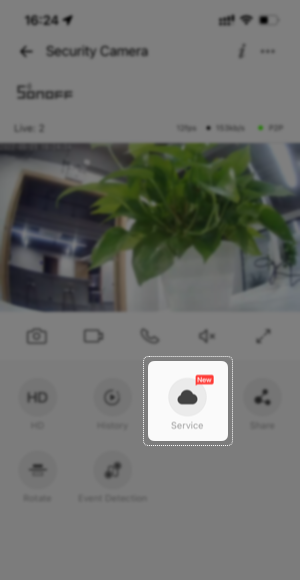
Currently, only SONOFF CAM Slim GEN 2、CAM-PT2、CAM-B1P support the Plan. If your camera works with the Plan, there is a “Service” button with a cloud icon on the camera page.
There are two subscription plans available. Both share the same features. The monthly plan comes with a 30-day free trial, while the annual plan comes with a 90-day free trial. If you don’t know how long you will need the Plan features, start with the monthly plan at $2.19/month per camera. You can cancel anytime before each renewal date. Compared to the monthly plan, the annual plan is of course, more cost-effective. Less than $2 per month. Choose the one you prefer.
After subscription, please make sure you have enabled motion detection in the camera Settings. Then when camera detects any motion, the recorded videos will be stored in the cloud.
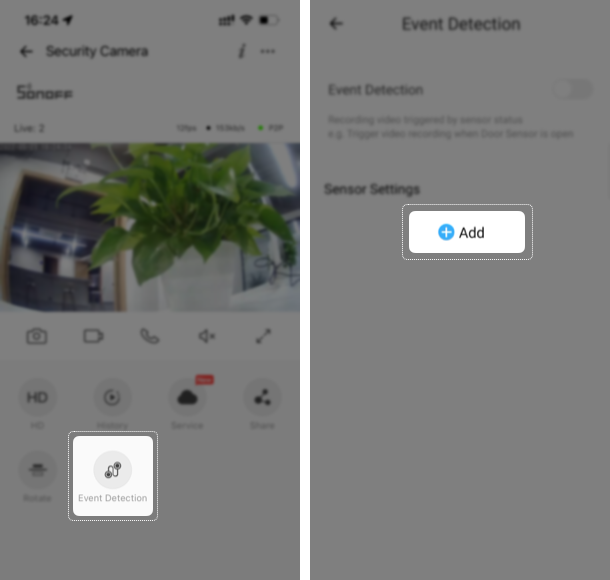
Adding a sensor to trigger video recording is more accurate than ever. So if you have sensors like door sensor, motion sensor, and smoke detector etc, add it to the Sensor Settings and then enable event detection. When the status of the sensor changes, the camera will start recording the event videos and you get notified right away.
Link your eWeLink account to Alexa or Google Home first, and discover the camera on the Alexa App or Google Home App. Ask Alexa or Google to show you the live streaming whenever it’s not easy to reach your phone. If you subscribed to Advanced Plan, you’ll be able to watch the live streaming on eWeLink Web as well. One subscription with multiple access to live feed. More convenient than ever.
eWeLink Camera Plan is not limited to the features mentioned above. Join now to unlock more exclusive features that make your camera better.
See which Matter devices work with eWeLink and how to set them up.
Manage devices faster from the eWeLink Home page.
Run your favorite eWeLink manual scenes with Siri voice commands on your iPhone.
Set a duration to confirm device state and run scenes reliably.